TH18 Progress Base – Open-Centre Perimeter Wall Layout
TH18 progress base with an open-centre perimeter wall layout that keeps upgrades and wall work easy to plan. Use it while progressing through Town Hall 18 and organising your next…
Download/Copy This Base
Opens the official Clash of Clans layout link. Check the preview in game before you replace your current layout.
Base Layout Analysis
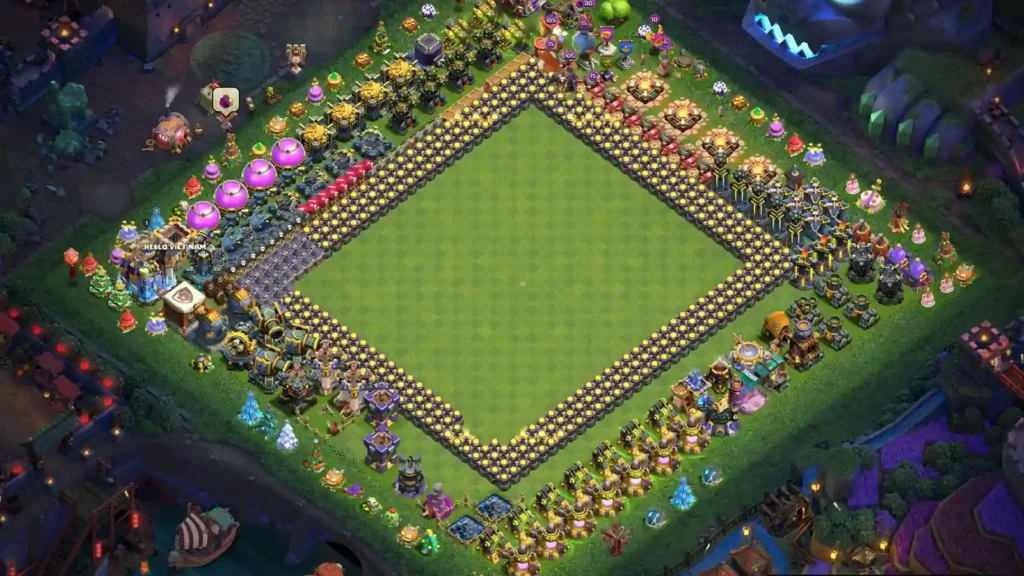
This TH18 Progress Base is defined by its large open centre and outer perimeter building groups. The clear interior is a working field rather than a drawing. The design is ideal for players who prefer a spacious view of every major upgrade group while keeping the village uncluttered.
Upgrade Organisation
Most important building categories are positioned around the outside of the open central field. This makes it easy to move visually from one group to another and compare upgrade status without the centre becoming packed with unrelated structures. Defences, resource buildings, heroes and utility structures remain accessible from the perimeter, which gives the base a clean management-board feel.
Wall Management
The walls form a broad boundary around the empty interior rather than a conventional defensive network. This keeps wall placement separate from the surrounding upgrade groups and makes the wall line easy to inspect as one visible project. The arrangement is practical for checking overall wall progress, not for defending a war attack.
Building Groups
Village structures are organised along the upper, left and lower working edges. Resource buildings are held in visible clusters, while defences remain separately recognisable and hero-related buildings are easy to locate. This helps the player quickly identify which category is next in the upgrade plan without repeatedly using the builder list.
Open Centre
The large empty centre is the main strength of this layout. It provides visual breathing room, keeps the perimeter groups easy to tap and creates a useful temporary space while reorganising the village. It isn’t built for farming, trophies or war.
Priorities
- Clear village-wide upgrade overview
- Perimeter wall progress tracking
Trap placement
Just left of the Air Defense row around 2 o’clock, red Air Bombs line the outside of the upper-right wall strip. I would watch that long row if Loons move across the top of the display.
Defense mechanics
The walls outline a large hollow square, with buildings lined up around its outside. I can see the empty center at a glance and inspect each upgrade row along the rim. The Hall is on the left edge. For a progress display that separation is easy to follow, though the outside rows give raiders direct targets.
Base design
My first look always goes to the hollow square. When its outline is one colour, my walls for that level are finished. Buildings line up around the outside, so one lap of the rim shows every upgrade that’s waiting. The empty middle also gives me room to shuffle buildings without breaking a row.
Before You Download/Copy This Base
- Match the Town Hall. This layout is for TH18. Compare the image with your village before placing any missing buildings.
- Check the layout. Check whether the wall and building groups suit your upgrade plan.
- Adjust to your village. Use the grouping as a starting point and change it to match your village.
More TH18 Bases